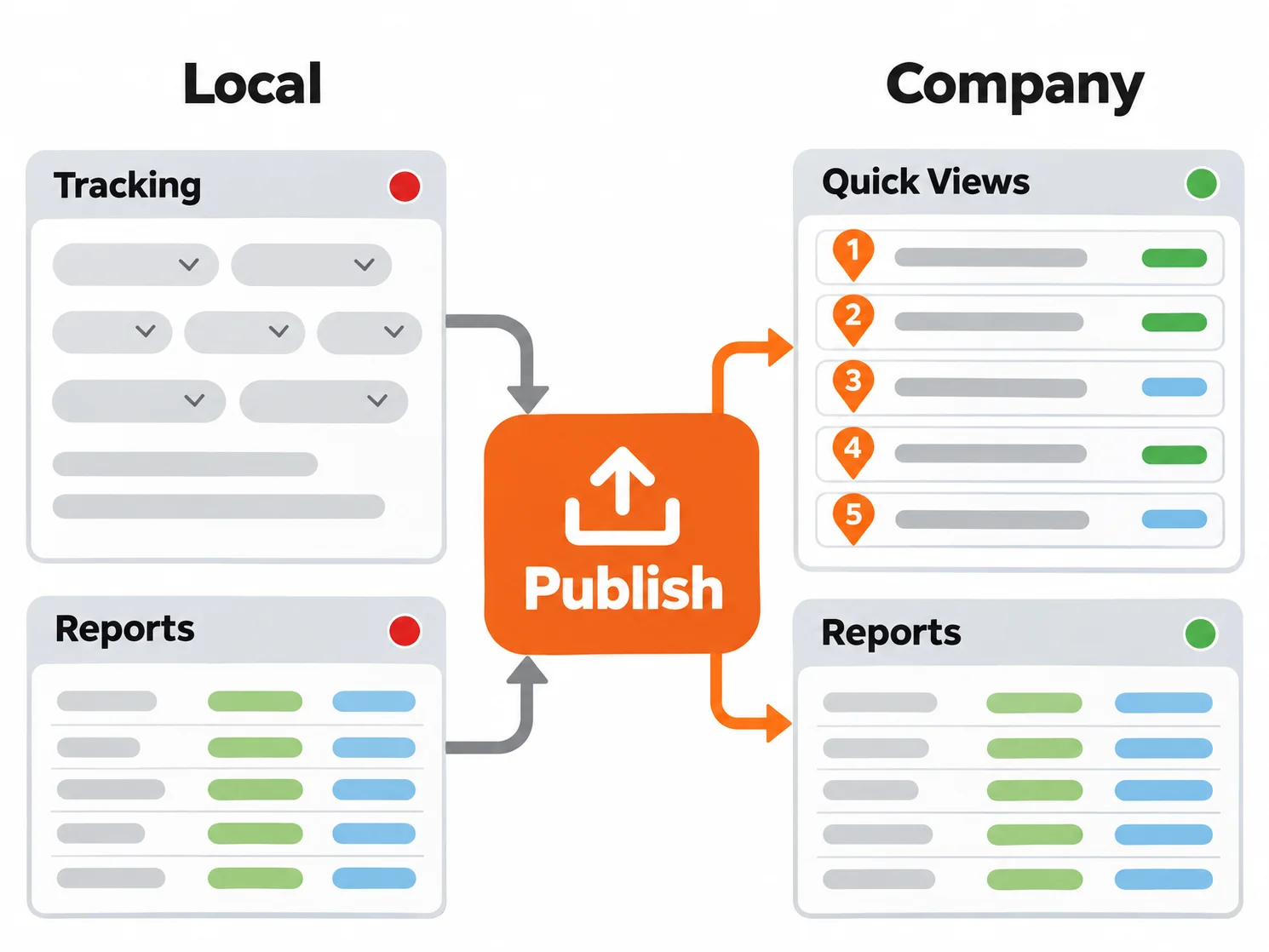
Shared delivery views and reports give a delivery company something more useful than a customized screen or a polished document. They give dispatch, customer service, billing, and management a common operating configuration. With Global Quick Views and published report customizations in OnTime 360, a company can define how teams see shipment data and how reports present it, then distribute those standards across the organization.
That consistency matters when a dispatcher is reviewing today's scheduled work, a customer service representative is checking delivery exceptions, or an accounting team is preparing billing documentation. Each person can work from information arranged for the job at hand, without management needing to recreate the same configuration on every workstation.
Shared Delivery Views and Reports Support Consistent Decisions
Delivery operations depend on people seeing the right information in the right context. A dispatch manager may want a Tracking view that brings due times, assigned drivers, current status, and customer references into one practical working list. A billing manager may want a report format that consistently includes the shipment details a customer expects to receive with an invoice.
Making those decisions at the company level does not take judgment away from individual users. It gives them a reliable starting point. Local Quick Views can still serve personal preferences, while company-wide views establish the filters and layouts that support a defined operating process.
The broader teamwork research supports the value of a common picture of the work. A 2010 meta-analysis of team cognition examined 231 correlations from 65 independent studies and found strong positive relationships between team cognition, team behavioral processes, and performance. For a delivery company, the practical lesson is straightforward: when teams work from consistent definitions of what needs attention, it is easier to coordinate the next action around the same shipment information. (See the study's PubMed record details.)
A second meta-analysis, covering 72 independent studies with 4,795 groups and 17,279 participants, found that information sharing positively predicted team performance across the conditions studied. This is not a courier-specific finding, but it reinforces a useful operational principle: information has more value when it is available in a form the team can use consistently. (See the information-sharing meta-analysis.)
Use Global Quick Views to Set a Company Standard
Quick Views save the appearance and filtering of the Tracking view. They let a company shape a view around a specific role, work queue, or decision instead of expecting every user to arrange columns and rebuild filters independently.
With Global Quick Views, an authorized user can make a Quick View available to any PC signed in to the account. That creates a shared library of company views while preserving the option for users to maintain local views when their own work calls for a different arrangement.
A courier company might publish Quick Views such as:
- Morning Dispatch: A view for reviewing orders due for collection, assignment status, scheduled times, and service level before routes leave the depot.
- Delivery Exceptions: A view focused on orders that need customer communication, a revised assignment, or documented follow-up.
- Completed for Billing: A view for checking completed work and the information needed before invoices are prepared.
- Customer Service Lookup: A view that brings tracking number, customer reference, status, and delivery timing into a consistent order for call handling.
The value is not in having more views. It is in deliberately naming and maintaining the few views that reflect how the company runs its work. New dispatchers can begin with the same Tracking configuration experienced staff use. Managers can explain a review process by referring to one published view. Teams in different offices can use the same filters when discussing a customer account, a route, or an exception.
Publish Report Customizations Without Manual File Sharing
Reports often become part of a company's service standard. They may support billing review, driver compensation, customer documentation, management reporting, or recurring operational checks. When the layout or contents of a report are customized, that format should be available wherever the report is used.
OnTime lets a manager publish report template modifications to the server for other users in the company. Rather than manually exporting a report template file, sending it to individual workstations, and importing it again, the company can publish the approved template for synchronized distribution.
Users receive newly published templates when they close and reopen OnTime Management Suite, as long as the Synchronize report templates option is enabled in General Options. That detail gives managers a practical rollout point: publish the final template, let affected users know when to restart the application, and confirm the standard format is in place before the next billing cycle or management review.
Publishing is especially useful when a report needs to reflect a company decision, such as the order of shipment fields, the details included in a customer-facing document, or a layout that makes internal review faster. The report remains tailored to the company's process, and the approved version becomes available to the team that uses it.
Treat Configuration as an Operational Standard
Company-wide views and report templates work best when they are managed with the same care as a rate sheet or a customer service procedure. The goal is not to restrict every user. The goal is to make the organization's preferred way of reviewing delivery information clear, repeatable, and easy to adopt.
- Start with a specific decision. Build a Quick View or report around the information a role needs to act on, such as overdue collections, completed orders awaiting billing, or service exceptions.
- Use practical names. A name such as "Unassigned Same-Day Orders" tells a dispatcher what the view is for before opening it.
- Limit the first company library. A short set of well-maintained views is easier to learn and govern than a long list of overlapping options.
- Assign ownership. Decide who approves changes to shared Tracking views and report templates, especially when the configuration supports billing or customer documentation.
- Review after process changes. When service levels, customer requirements, billing procedures, or dispatch responsibilities change, check whether the shared configuration still supports the new process.
This approach also makes onboarding more concrete. Instead of telling a new dispatcher to filter the Tracking view for a certain type of work, a manager can point them to the company's published view. Instead of explaining which report template to import, the billing team can work from the centrally published format.
Plan Availability for Company-Wide Customization
Publish Report Customizations and Global Quick Views were introduced under former Professional and Grow subscription labels. In the current OnTime plan structure, both capabilities are included with Team, Business, and Enterprise plans. Review current OnTime subscription plans to confirm the features available for your account.
Make Your Operating Standard Easy to Share
A customized Tracking view or report has more value when it is not limited to the computer where it was created. Global Quick Views and published report customizations give delivery companies a practical way to turn configuration into a shared operational standard. Everyone does not need to work identically, but everyone can begin with the same approved view of the work.
Start your free trial to see how OnTime can support the way your delivery company dispatches, tracks, reviews, and reports on its work.